Persistence (Save Vehicles) [Enhanced] 1.6.6


1.563
15
1.563
15
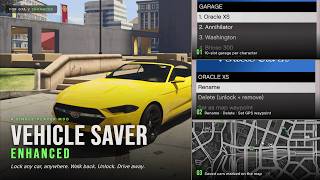
Persistence Pro lets you save any vehicle anywhere on the map and walk back to it later, even after restarting the game. Park it, press [E], and it will be waiting exactly where you left it. No unlock step, no extra menus. Includes per-character garages, colour-coded map blips, and a full in-game menu accessible with [F7].
Installation
To configure, edit scripts\PersistencePro.ini in any text editor. Every setting includes an inline comment. Press [Insert] in-game to reload after making changes, or relaunch the game.
Features
Changelog
v1.6.6
If you were affected, just install the new version - you don't need to edit anything. To make blips even smaller, set F7 - Settings - Blip Size - Small.
v1.6.4
v1.5.4
v1.5.3
v1.5.2
v1.5.1
Installation
- Make sure you have installed ScriptHookV (Enhanced-compatible build) and ScriptHookVDotNet (Enhanced nightly).
- Locate your GTA V Enhanced install folder (the one containing GTA5 Enhanced.exe). Open or create a scripts subfolder inside it.
- Copy the following files from the downloaded ZIP into <GTA V Enhanced>\scripts\:
PersistencePro.dll (required)
PersistencePro.ini (config file, auto-generated on first launch if missing) - Launch the game. Within a few seconds a green ticker will confirm: "PersistencePro loaded. [E] lock/unlock, [F7] menu."
To configure, edit scripts\PersistencePro.ini in any text editor. Every setting includes an inline comment. Press [Insert] in-game to reload after making changes, or relaunch the game.
Features
- Save with [E]. One keypress saves your vehicle. A horn beep and headlight flash confirm the save.
- Always drivable. Saved vehicles require no unlock prompt. Pedestrian AI ignores them while parked, so they will not be carjacked while you are away.
- Position tracking. Move the car to a new spot and the save updates automatically. Persists through crashes and restarts.
- 60-slot shared garage by default, or 10 slots per character. Switchable from the in-game Settings menu.
- Map blips. Live blips with per-character colours (Michael blue, Franklin green, Trevor orange) and class-specific icons for cars, bikes, helicopters, boats, and planes. Configurable size, with automatic minimap declutter at distance.
- Full customisation saved. Paint, custom RGB colours, liveries, all 50 mod slots, wheel type, tyre variation, extras, window tint, interior and dashboard colour, neon lights, tyre-smoke colour, xenon headlight colour, licence plate, vehicle health, and towed trailers.
- Trainer and LS Customs compatible. Any modifications applied to a saved vehicle are re-captured automatically when you step out.
- In-game garage menu [F7]. Per-character submenus with options to rename vehicles, set a GPS waypoint, respawn a repaired copy at the saved location, unstuck a vehicle from water or geometry, and delete a vehicle from tracking without removing it from the world.
- In-game Settings. Toggle shared or per-character garages, adjust blip size, configure minimap display, toggle the horn beep, and rebind the menu hotkey.
- Safe by default. Automatically disabled in GTA Online and during scripted cutscenes.
Changelog
v1.6.6
- Fixed: map blips were huge and the Blip Size setting did nothing on some PCs. If your Windows region uses a comma as the decimal separator (common in Europe), the mod read its number settings wrong - so blips came out about 10x too big and covered the map, and every "Blip Size" option looked like it did nothing. All settings are now read correctly no matter your region, and blip size is capped so it can never cover the map again.
- Changing Blip Size now applies instantly - no more reloading the game to see the new size.
- Smaller default blip size for a cleaner map out of the box. Adjust any time in F7 - Settings - Blip Size (Small / Medium / Large).
- Fixed: "Teleport to me" now faces the car toward you. A teleported car could spawn pointing the wrong way: it now lines up with you, and that facing is saved so it stays correct after a respawn or reload.
- Fixed: save-file version tag is now written correctly, preventing problems with future updates. Your existing saves are unaffected.
- Under the hood: reduced log spam from map blips and removed some dead code. No change to how the mod plays.
If you were affected, just install the new version - you don't need to edit anything. To make blips even smaller, set F7 - Settings - Blip Size - Small.
v1.6.4
- Saves now capture every customization - added licence plate style/colour (Blue-on-White, Yellow-on-Black, Yankton, etc.) and bulletproof tyres, on top of the paint, custom RGB, wheels/tyres, drift upgrade, HSW and all other Los Santos Customs mods, neon, xenon, interior/dashboard colours, window tint, livery, turbo and plate text that already saved.
- Damage and dirt are no longer kept - a saved car now always comes back clean and fully repaired.
- The pause-menu big map now shows ALL your saved cars, while the minimap still only shows nearby ones - so the map stays uncluttered during play but you can always find any car.
- The F7 menu stays open after an action. Teleport / Respawn / Unstuck / Set waypoint keep you on the same car so you can chain actions: Rename shows the new name: Delete drops you back to the list.
- New "Teleport to me" per-car option - brings the car to a clear spot right next to you, and it won't clip into traffic or your other cars (teleport several and they line up around you).
- Favorites - star a car to pin it to the top of the menu, give it its own Favorites list, and keep its map blip always visible.
- Search - find a saved car by name or licence plate.
- Smarter map blips - only nearby cars clutter the minimap, which keeps you under the game's blip limit so mission blips don't disappear.
- Map blips now show the licence plate next to the name instead of a live distance readout.
- The mod keeps working during cutscenes - it only pauses for actual loading screens (and stays off in GTA Online).
v1.5.4
- Smooth blip tracking (on by default) - the map blip now glides along with your car instead of stepping a few times a second.
- Fixed: blips froze during mission cutscenes - they now keep tracking through cutscenes while vehicle spawning stays safely paused.
- The car you're currently driving no longer shows its own map blip.
v1.5.3
- Off-road bikes and quads now drive correctly when saved. Vehicles such as the Nagasaki Blazer were respawning with the engine off, making the throttle unresponsive. They now mount and ride normally. The fix auto-recovers any affected vehicle already saved under an earlier version.
- Garage capacity raised to 60 vehicles in shared mode (previously 30).
- Any saved vehicle you enter is now guaranteed to be unfrozen and ready to drive.
v1.5.2
- Map blip tracking corrected. Fixed a bug where the vehicle icon could glitch and stop following its live position.
- Blip flicker after Respawn, Unstuck, and Rename operations resolved.
- Blips now refresh more smoothly while driving.
v1.5.1
- Stability and save-reliability improvements. An interrupted save can no longer leave a stray temporary file, and a valid save can no longer be silently skipped.
- Auto-save-on-exit hardened against errors triggered while exiting a vehicle.
- Per-frame workload reduced for better performance.
- Removed leftover wording from the old lock/unlock system in the menu.
İlk Yüklenme Zamanı: 13 Mayıs 2026 Çarşamba
Son Güncellenme Zamanı: 7 Haziran 2026 Pazar
Last Downloaded: 35 dakika önce
17 Yorum
Persistence Pro lets you save any vehicle anywhere on the map and walk back to it later, even after restarting the game. Park it, press [E], and it will be waiting exactly where you left it. No unlock step, no extra menus. Includes per-character garages, colour-coded map blips, and a full in-game menu accessible with [F7].
Installation
To configure, edit scripts\PersistencePro.ini in any text editor. Every setting includes an inline comment. Press [Insert] in-game to reload after making changes, or relaunch the game.
Features
Changelog
v1.6.6
If you were affected, just install the new version - you don't need to edit anything. To make blips even smaller, set F7 - Settings - Blip Size - Small.
v1.6.4
v1.5.4
v1.5.3
v1.5.2
v1.5.1
Installation
- Make sure you have installed ScriptHookV (Enhanced-compatible build) and ScriptHookVDotNet (Enhanced nightly).
- Locate your GTA V Enhanced install folder (the one containing GTA5 Enhanced.exe). Open or create a scripts subfolder inside it.
- Copy the following files from the downloaded ZIP into <GTA V Enhanced>\scripts\:
PersistencePro.dll (required)
PersistencePro.ini (config file, auto-generated on first launch if missing) - Launch the game. Within a few seconds a green ticker will confirm: "PersistencePro loaded. [E] lock/unlock, [F7] menu."
To configure, edit scripts\PersistencePro.ini in any text editor. Every setting includes an inline comment. Press [Insert] in-game to reload after making changes, or relaunch the game.
Features
- Save with [E]. One keypress saves your vehicle. A horn beep and headlight flash confirm the save.
- Always drivable. Saved vehicles require no unlock prompt. Pedestrian AI ignores them while parked, so they will not be carjacked while you are away.
- Position tracking. Move the car to a new spot and the save updates automatically. Persists through crashes and restarts.
- 60-slot shared garage by default, or 10 slots per character. Switchable from the in-game Settings menu.
- Map blips. Live blips with per-character colours (Michael blue, Franklin green, Trevor orange) and class-specific icons for cars, bikes, helicopters, boats, and planes. Configurable size, with automatic minimap declutter at distance.
- Full customisation saved. Paint, custom RGB colours, liveries, all 50 mod slots, wheel type, tyre variation, extras, window tint, interior and dashboard colour, neon lights, tyre-smoke colour, xenon headlight colour, licence plate, vehicle health, and towed trailers.
- Trainer and LS Customs compatible. Any modifications applied to a saved vehicle are re-captured automatically when you step out.
- In-game garage menu [F7]. Per-character submenus with options to rename vehicles, set a GPS waypoint, respawn a repaired copy at the saved location, unstuck a vehicle from water or geometry, and delete a vehicle from tracking without removing it from the world.
- In-game Settings. Toggle shared or per-character garages, adjust blip size, configure minimap display, toggle the horn beep, and rebind the menu hotkey.
- Safe by default. Automatically disabled in GTA Online and during scripted cutscenes.
Changelog
v1.6.6
- Fixed: map blips were huge and the Blip Size setting did nothing on some PCs. If your Windows region uses a comma as the decimal separator (common in Europe), the mod read its number settings wrong - so blips came out about 10x too big and covered the map, and every "Blip Size" option looked like it did nothing. All settings are now read correctly no matter your region, and blip size is capped so it can never cover the map again.
- Changing Blip Size now applies instantly - no more reloading the game to see the new size.
- Smaller default blip size for a cleaner map out of the box. Adjust any time in F7 - Settings - Blip Size (Small / Medium / Large).
- Fixed: "Teleport to me" now faces the car toward you. A teleported car could spawn pointing the wrong way: it now lines up with you, and that facing is saved so it stays correct after a respawn or reload.
- Fixed: save-file version tag is now written correctly, preventing problems with future updates. Your existing saves are unaffected.
- Under the hood: reduced log spam from map blips and removed some dead code. No change to how the mod plays.
If you were affected, just install the new version - you don't need to edit anything. To make blips even smaller, set F7 - Settings - Blip Size - Small.
v1.6.4
- Saves now capture every customization - added licence plate style/colour (Blue-on-White, Yellow-on-Black, Yankton, etc.) and bulletproof tyres, on top of the paint, custom RGB, wheels/tyres, drift upgrade, HSW and all other Los Santos Customs mods, neon, xenon, interior/dashboard colours, window tint, livery, turbo and plate text that already saved.
- Damage and dirt are no longer kept - a saved car now always comes back clean and fully repaired.
- The pause-menu big map now shows ALL your saved cars, while the minimap still only shows nearby ones - so the map stays uncluttered during play but you can always find any car.
- The F7 menu stays open after an action. Teleport / Respawn / Unstuck / Set waypoint keep you on the same car so you can chain actions: Rename shows the new name: Delete drops you back to the list.
- New "Teleport to me" per-car option - brings the car to a clear spot right next to you, and it won't clip into traffic or your other cars (teleport several and they line up around you).
- Favorites - star a car to pin it to the top of the menu, give it its own Favorites list, and keep its map blip always visible.
- Search - find a saved car by name or licence plate.
- Smarter map blips - only nearby cars clutter the minimap, which keeps you under the game's blip limit so mission blips don't disappear.
- Map blips now show the licence plate next to the name instead of a live distance readout.
- The mod keeps working during cutscenes - it only pauses for actual loading screens (and stays off in GTA Online).
v1.5.4
- Smooth blip tracking (on by default) - the map blip now glides along with your car instead of stepping a few times a second.
- Fixed: blips froze during mission cutscenes - they now keep tracking through cutscenes while vehicle spawning stays safely paused.
- The car you're currently driving no longer shows its own map blip.
v1.5.3
- Off-road bikes and quads now drive correctly when saved. Vehicles such as the Nagasaki Blazer were respawning with the engine off, making the throttle unresponsive. They now mount and ride normally. The fix auto-recovers any affected vehicle already saved under an earlier version.
- Garage capacity raised to 60 vehicles in shared mode (previously 30).
- Any saved vehicle you enter is now guaranteed to be unfrozen and ready to drive.
v1.5.2
- Map blip tracking corrected. Fixed a bug where the vehicle icon could glitch and stop following its live position.
- Blip flicker after Respawn, Unstuck, and Rename operations resolved.
- Blips now refresh more smoothly while driving.
v1.5.1
- Stability and save-reliability improvements. An interrupted save can no longer leave a stray temporary file, and a valid save can no longer be silently skipped.
- Auto-save-on-exit hardened against errors triggered while exiting a vehicle.
- Per-frame workload reduced for better performance.
- Removed leftover wording from the old lock/unlock system in the menu.
İlk Yüklenme Zamanı: 13 Mayıs 2026 Çarşamba
Son Güncellenme Zamanı: 7 Haziran 2026 Pazar
Last Downloaded: 35 dakika önce
 5mods on Discord

I installed version 1.5.0 of the mod.
I reinstalled it with 1.5.3, deleting the previous version, specifically the files: PersistencePro.dll and
PersistencePro.ini
I still have my saved cars from the previous version. Question: Where does the mod hide the saved cars?
@Eksayfri
To find your saved cars:
\AppData\Roaming\GTA V\PersistencePro
@Suxhe Thanks. One more question/request: is it possible to remove the car icon from the minimap when you've entered it?
@Eksayfri I'll make sure the mod functions this way in the next update.
I'm the official tester of this mod :D
Two more points:
- Air suspension and drift tires don't save.
- Near the story mission point, the mod stops working. Even F7 doesn't work. Drive further, and everything works.
And I'd like to see the license plate number in brackets next to the car name on the minimap (if you have two or three identical cars). I'd also like the saved car folder to be in Scripts. Thanks.
@Eksayfri
I'll work on it brother
@Suxhe
Has the vehicle locking feature been removed? It would be great to have a lock function both while driving and when parked. In the current version, pressing the E key triggers a horn sound and saves the state, but pressing E again does nothing, which feels a bit underwhelming.
@Suxhe would love to use this mod, but when locking the car, the headlights and all the lights of the car dont turn off so it breaks the immersion, could u add it so the car lights turn on/off when the car's locked/unlocked
I think I did everything correctly, but for some reason it doesn't work, and a notification appears on the right : INFO: 1 scripts are running but are using the v2 API (ScriptHookVDotNet2.dll), which is deprecated and actively supported. It may stop being supported in the future, disabling the ability to run the scripts. You could contact the author(s) or find alternatives to avoid the issue. See the console outputs or the log file for more details.
@Hotary hi bro, make sure you have installed Script Hook V .Net Enhanced and ScriptHookV by Alexander
@Thirsty_edits Are you using the latest version?
@kimdusics It has been removed because I've implemented a different saving mechanism.
@Suxhe i think so, if ur implying the lights turn off with the latest version ill reinstall it and try it out
so unlocking/locking doesnt work? can you fix so that bikes engine will switch off? this mod somehow makes bikes engine running even after using gameplayfixes and manual engine off mod
does this also work for legacy?
Great mod and thankfully it works with the enhanced version. But I have an important question. Where are all saved cars files stored? If I need to reinstall the game, I hope there is a way to not lose all the saves! Please reply!
@Nedim95
\AppData\Roaming\GTA V\PersistencePro