Advanced Custom Blips [.NET] 3.0






![4b8297 6b6ff3 6[1]](https://img.gta5-mods.com/q95/images/advanced-custom-blips-fe7d9d03-1fc1-4088-9fae-005dc2b1a270/4b8297-6b6ff3-6[1].png)
![4b8297 6b6ff3 8[1]](https://img.gta5-mods.com/q95/images/advanced-custom-blips-fe7d9d03-1fc1-4088-9fae-005dc2b1a270/4b8297-6b6ff3-8[1].png)

1.110
22
1.110
22
Advanced Custom Blips v3.0
Permissions / License
If you enjoy this mod, consider supporting me — even $1 helps!
PayPal: Soliman@dapoupharma.com
---
Table of Contents:
1. Description
Advanced Custom Blips lets you add and manage custom map blips exactly the way you want. The mod features on-screen icon selection and preview blip in front of the player. You can load Addon Blips mod config blips with a single button (see the "FAQ" section to learn more). Create, edit, copy, and teleport to custom blips entirely in-game — no manual INI editing required (unless you prefer it). The mod also includes predefined locations for gas stations, fire departments, police departments, markets, medical centers, ATMs, and metro stations. Each category can be toggled individually via the in-game LemonUI menu (all categories are off by default).
Explanation of INI sections (if you still want to add blips manually):
Hotkeys (Configurable):
Notes:
Important:
2. Features
3. Requirements
4. Installation
5. Known Bugs & Mod Conflicts
6. FAQs
7. Changelog
8. Credits
---
If this mod is useful to you, please consider donating — even $1 helps motivate me to keep updating and making mods.
PayPal: Soliman@dapoupharma.com
Permissions / License
- Do NOT re-upload this mod to any other site.
- Do NOT sell, bundle, or include this mod in paid content.
- You may share your own custom INI files as long as they require this mod to work.
- Please always link back to the official mod page when sharing INI files.
If you enjoy this mod, consider supporting me — even $1 helps!
PayPal: Soliman@dapoupharma.com
---
Table of Contents:
1. Description
2. Features
3. Requirements
4. Installation
5. Known Bugs & Mod Conflicts
6. FAQs
7. Changelog
8. Credits
1. Description
Advanced Custom Blips lets you add and manage custom map blips exactly the way you want. The mod features on-screen icon selection and preview blip in front of the player. You can load Addon Blips mod config blips with a single button (see the "FAQ" section to learn more). Create, edit, copy, and teleport to custom blips entirely in-game — no manual INI editing required (unless you prefer it). The mod also includes predefined locations for gas stations, fire departments, police departments, markets, medical centers, ATMs, and metro stations. Each category can be toggled individually via the in-game LemonUI menu (all categories are off by default).
Explanation of INI sections (if you still want to add blips manually):
- Toggle Coordinates Key: Toggle current player coordinates key (reference here). Example: NumPad3
- Reload Blips Key: Reload blips key (reference here). Example: K
- Toggle Blips Visibility key: Blips visibility key (reference here). Example: D7
- Open Menu Key: Open main menu key (reference here). Example: F9
- Blip Name: The blip’s name. Example: Clucking Bell Farms
- Blip Icon: The icon/texture (reference here). Example: 273 or radar_chop
- Blip Size: Scale/size multiplier (1.0 = default). Example: 0.8
- Blip Color: Color (white = default) (reference here). Example: 1 or Red
- Flashing State: Enable/disable blinking effect. Example: OFF
- Flash Interval: Blink speed in milliseconds (higher = slower). Example: 1500
- Short Range State: Shows only when nearby. Example: ON
- X: The "X" coordinate of the blip. Example: -80.4800
- Y: The "Y" coordinate of the blip. Example: 6243.0698
- Z: The "Z" coordinate of the blip. Example: 66.8366
Hotkeys (Configurable):
- Toggle Coordinates Key:
- Function: Toggles the on-screen display of the player's current coordinates (X, Y, Z).
- Default Key: F1
- Reload Blips Key:
- Function: Reloads the blip data from the "Advanced Custom Blips.ini" file, applying any changes made to it without restarting the script.
- Default Key: F2
- Toggle Blip Visibility Key:
- Function: Hides or shows all the custom blips that have been loaded from the INI file on the map.
- Default Key: F3
- Open Menu Key:
- Function: Opens the main LemonUI menu for the script, allowing access to settings, adding blips, and managing existing ones.
- Default Key: F10
Notes:
- When adding a new blip in "Add New Blip" menu, leaving the Size/Scale field empty will automatically use the default blip size (1.0). Similarly leaving the X, Y, and Z fields empty will automatically use your current player coordinates. Same can be said for Flash Interval (100)
- In "Global Settings" menu when choosing key, you can either scroll through the list or press Enter then press the key you want to assign
- For manual editing: all blip fields (e.g., Blip Name, Blip Color, Flashing State) and their values are case-insensitive.
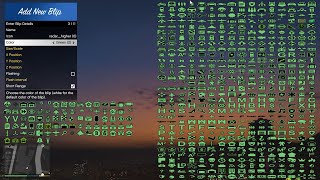
- When choosing an icon from on-screen, make sure to click as much as possible at the center of the icon to select it.
Important:
- The full list of the 800+ blip icons are not shown on the screen, what is shown on screen are some not all, to see all available blip icons scroll through the icon list.
- There are some blips that are not clickable because I could not find its ID
- Use "." (dot) for decimal numbers, not "," (comma).
- Flash Interval has no effect if Flashing State is set to OFF.
- Blip name cannot be empty, contain only whitespace, or include an "_" (underscore).
- This script has only been tested on the Legacy version of GTA V. I cannot guarantee its functionality on the Enhanced version of GTA V (it may or may not work as intended), as it was not tested there and won't get tested by me.
- If you ever get an "access denied" error, here’s how to fix it: Right-click on the "file the error occurred" on → Select and press 'Properties' → In the 'General' tab → Look for 'Attributes' → Make sure the 'Read-only' checkbox is unchecked. (See image above for a better explanation)
- Don’t hesitate to suggest features, improvements, bug, or anything else about this script mod. I’ll be more than happy to read your suggestions.
2. Features
- LemonUI menu for adding, editing, copying, deleting, and teleporting to custom blips in-game
- Real-time preview blip in front of your player before saving
- On-screen icons selection with preview of their color
- Support for Addon Blips, now you can load their txt blips seamlessly
- 800+ available blip icons
- 80+ available blip colors
- Configurable hotkeys (coordinates display, reload blips, open menu, and toggle visibility of custom blips)
- Predefined locations of gas stations, fire departments, police departments, markets, medical centers, ATMs, and metro stations. Each category can be toggled on or off individually via the in-game LemonUI menu (all categories are toggled off by default).
- Support for both INI manual editing and in-game GUI
- Improved error handling and stability
3. Requirements
- Grand Theft Auto V Legacy (as mentioned above)
- Script Hook V
- Script Hook V .NET (nightly)
- .NET Framework 4.8
- LemonUI
4. Installation
- Ensure that Script Hook V, Script Hook V .NET (nightly), .NET Framework 4.8, and LemonUI are properly installed
- Extract all files into your "scripts" folder (create it if missing, using the exact same name) in your GTA V Legacy directory
- Add blips via the in-game menu (open menu with the F10 key) or by editing Advanced Custom Blips.ini
5. Known Bugs & Mod Conflicts
- I have tested with 100+ custom blips without issues. Your custom blips will work fine. However, blips created by other mods
may lose their names (the icons still show but without names), and some vanilla GTA blips may completely disappear if too
many blips are active at once (sometimes all vanilla blips). If you add more than 170 custom blips, their names may disappear
and the notification for the number of blips, if enabled, does not show.
- For some unknown reason, when using too many scripts and then toggling the coordinates display system, the coordinates may not show.
- When enabling or disabling category blips, the game may freeze for 1–2 seconds due to large I/O operations. A fix is in development for v4.0 to make this more optimized and smoother.
6. FAQs
- Q: I found a bug(s) and/or mod conflict(s). How can I report it?
A: Contact me directly through the mod’s page (officially on the GTA5Mods website) and include the contents of "Advanced Custom Blips Log.txt" if the file exists in the "scripts" folder.
- Q: Can I add blips manually?
A: Yes, just copy an INI section, edit its values, and give the new section a new name.
- Q: Can I use custom-made textures/icons?
A: No, only built-in GTA V Legacy blip icons are supported.
- Q: Will you add support for Enhanced version of GTA V?
A: As discussed, it may or may not work — it has not been tested there and won't get tested by me. But if many users report that it does work as intended, I will update the mod page to confirm it is functioning on this version.
- Q: Does this mod affect performance (FPS)?
A: Only the moment when enabling/disabling any of the category blips, else minimal to no impact. Refer to "Known Bugs & Mod Conflicts" section for more information. Feel free to report any performance issues.
- Q: How to disable a key (e.g., menu key, reload key, coordinates display key, and etc.)?
A: You can disable keys in two ways:
- Via INI file: Open "Advanced Custom Blips.ini" (in your GTA V "scripts" folder).
Under the [Settings] section, find the key you want to disable and replace its value with "None".
Example: To disable the menu key (F10 by default), change
Open_Menu_Key = F10 → Open_Menu_Key = None.
- In-game menu: Open the menu using F10, go to Global Settings, and find the key you wish to disable.
Scroll through the list until it shows "None", then select and press Save Changes.
- Via INI file: Open "Advanced Custom Blips.ini" (in your GTA V "scripts" folder).
- Q: How to add custom blips from "Addon Blips" mod to this mod?
A: Step 1: Place the "Addon Blips" folder (the folder that contains the mod's .txt blip files) in scripts folder.
Step 2: Open the in-game menu (default F10) → go to Global Settings → check "Enable Add-On blips" → press Save. The Addon Blips will be loaded automatically at script startup.
Important notes:- You do NOT need the full Addon Blips mod installed — only its folder and .txt files are required.
- Unchecking the option and saving removes those blips from Advanced Custom Blips.ini only; the original .txt files in the Addon Blips folder are left untouched.
7. Changelog
- v3.0 – Improved
- Added: On-screen icons selection with preview of their color
- Added: Support for "Addon Blips" txt files
- Added: More blips
- Improved: Upgraded to LemonUI menu
- Fixed: flickering of the menu
- Fixed: Blip name in edit "blip name" menu
- Fixed: Mismatch between blip icon ID and blip icon name
- v2.0 – Major Overhaul
- Added: Full NativeUI in-game menu (add, edit, copy, delete, and teleport to custom blips)
- Added: Real-time preview blip in front of player
- Added: Configurable hotkeys (reload, toggle visibility, open menu, and show coordinates)
- Added: Predefined locations of gas stations, fire departments, police departments, markets, medical centers, ATMs, and metro stations. Each category can be toggled on or off individually via the in-game NativeUI menu (all categories are toggled off by default)
- Added: Save actual names of Blip Icons/Colors in INI (not just IDs). Useful for manual editing users
- Improved: Error handling & coordinate display system
- v1.0 – Initial Release
- Basic INI-based blip creation
8. Credits
- Ali Osama — Script mod author and developer
- Rockstar Games — Grand Theft Auto V Legacy
- Alexander Blade — Script Hook V
- Crosire — Script Hook V .NET
- rickyah — INI File Parser
- Justalemon — LemonUI
- GTA Xtreme — Locations of markets, police departments, fire departments, ATMs, and medical centers
- RAYMILES — Locations of metro stations
- JoyLucien — Special thanks for suggesting the on-screen icons selection feature! And helping with the switch to LemonUI!
- KimonoBoy — Great documentation and guidelines on LemonUI menu
---
If this mod is useful to you, please consider donating — even $1 helps motivate me to keep updating and making mods.
PayPal: Soliman@dapoupharma.com
İlk Yüklenme Zamanı: 13 Ekim 2025, Pazartesi
Son Güncellenme Zamanı: 24 Ekim 2025, Cuma
Last Downloaded: 1 hours ago
63 Yorum
Advanced Custom Blips v3.0
Permissions / License
If you enjoy this mod, consider supporting me — even $1 helps!
PayPal: Soliman@dapoupharma.com
---
Table of Contents:
1. Description
Advanced Custom Blips lets you add and manage custom map blips exactly the way you want. The mod features on-screen icon selection and preview blip in front of the player. You can load Addon Blips mod config blips with a single button (see the "FAQ" section to learn more). Create, edit, copy, and teleport to custom blips entirely in-game — no manual INI editing required (unless you prefer it). The mod also includes predefined locations for gas stations, fire departments, police departments, markets, medical centers, ATMs, and metro stations. Each category can be toggled individually via the in-game LemonUI menu (all categories are off by default).
Explanation of INI sections (if you still want to add blips manually):
Hotkeys (Configurable):
Notes:
Important:
2. Features
3. Requirements
4. Installation
5. Known Bugs & Mod Conflicts
6. FAQs
7. Changelog
8. Credits
---
If this mod is useful to you, please consider donating — even $1 helps motivate me to keep updating and making mods.
PayPal: Soliman@dapoupharma.com
Permissions / License
- Do NOT re-upload this mod to any other site.
- Do NOT sell, bundle, or include this mod in paid content.
- You may share your own custom INI files as long as they require this mod to work.
- Please always link back to the official mod page when sharing INI files.
If you enjoy this mod, consider supporting me — even $1 helps!
PayPal: Soliman@dapoupharma.com
---
Table of Contents:
1. Description
2. Features
3. Requirements
4. Installation
5. Known Bugs & Mod Conflicts
6. FAQs
7. Changelog
8. Credits
1. Description
Advanced Custom Blips lets you add and manage custom map blips exactly the way you want. The mod features on-screen icon selection and preview blip in front of the player. You can load Addon Blips mod config blips with a single button (see the "FAQ" section to learn more). Create, edit, copy, and teleport to custom blips entirely in-game — no manual INI editing required (unless you prefer it). The mod also includes predefined locations for gas stations, fire departments, police departments, markets, medical centers, ATMs, and metro stations. Each category can be toggled individually via the in-game LemonUI menu (all categories are off by default).
Explanation of INI sections (if you still want to add blips manually):
- Toggle Coordinates Key: Toggle current player coordinates key (reference here). Example: NumPad3
- Reload Blips Key: Reload blips key (reference here). Example: K
- Toggle Blips Visibility key: Blips visibility key (reference here). Example: D7
- Open Menu Key: Open main menu key (reference here). Example: F9
- Blip Name: The blip’s name. Example: Clucking Bell Farms
- Blip Icon: The icon/texture (reference here). Example: 273 or radar_chop
- Blip Size: Scale/size multiplier (1.0 = default). Example: 0.8
- Blip Color: Color (white = default) (reference here). Example: 1 or Red
- Flashing State: Enable/disable blinking effect. Example: OFF
- Flash Interval: Blink speed in milliseconds (higher = slower). Example: 1500
- Short Range State: Shows only when nearby. Example: ON
- X: The "X" coordinate of the blip. Example: -80.4800
- Y: The "Y" coordinate of the blip. Example: 6243.0698
- Z: The "Z" coordinate of the blip. Example: 66.8366
Hotkeys (Configurable):
- Toggle Coordinates Key:
- Function: Toggles the on-screen display of the player's current coordinates (X, Y, Z).
- Default Key: F1
- Reload Blips Key:
- Function: Reloads the blip data from the "Advanced Custom Blips.ini" file, applying any changes made to it without restarting the script.
- Default Key: F2
- Toggle Blip Visibility Key:
- Function: Hides or shows all the custom blips that have been loaded from the INI file on the map.
- Default Key: F3
- Open Menu Key:
- Function: Opens the main LemonUI menu for the script, allowing access to settings, adding blips, and managing existing ones.
- Default Key: F10
Notes:
- When adding a new blip in "Add New Blip" menu, leaving the Size/Scale field empty will automatically use the default blip size (1.0). Similarly leaving the X, Y, and Z fields empty will automatically use your current player coordinates. Same can be said for Flash Interval (100)
- In "Global Settings" menu when choosing key, you can either scroll through the list or press Enter then press the key you want to assign
- For manual editing: all blip fields (e.g., Blip Name, Blip Color, Flashing State) and their values are case-insensitive.
- When choosing an icon from on-screen, make sure to click as much as possible at the center of the icon to select it.
Important:
- The full list of the 800+ blip icons are not shown on the screen, what is shown on screen are some not all, to see all available blip icons scroll through the icon list.
- There are some blips that are not clickable because I could not find its ID
- Use "." (dot) for decimal numbers, not "," (comma).
- Flash Interval has no effect if Flashing State is set to OFF.
- Blip name cannot be empty, contain only whitespace, or include an "_" (underscore).
- This script has only been tested on the Legacy version of GTA V. I cannot guarantee its functionality on the Enhanced version of GTA V (it may or may not work as intended), as it was not tested there and won't get tested by me.
- If you ever get an "access denied" error, here’s how to fix it: Right-click on the "file the error occurred" on → Select and press 'Properties' → In the 'General' tab → Look for 'Attributes' → Make sure the 'Read-only' checkbox is unchecked. (See image above for a better explanation)
- Don’t hesitate to suggest features, improvements, bug, or anything else about this script mod. I’ll be more than happy to read your suggestions.
2. Features
- LemonUI menu for adding, editing, copying, deleting, and teleporting to custom blips in-game
- Real-time preview blip in front of your player before saving
- On-screen icons selection with preview of their color
- Support for Addon Blips, now you can load their txt blips seamlessly
- 800+ available blip icons
- 80+ available blip colors
- Configurable hotkeys (coordinates display, reload blips, open menu, and toggle visibility of custom blips)
- Predefined locations of gas stations, fire departments, police departments, markets, medical centers, ATMs, and metro stations. Each category can be toggled on or off individually via the in-game LemonUI menu (all categories are toggled off by default).
- Support for both INI manual editing and in-game GUI
- Improved error handling and stability
3. Requirements
- Grand Theft Auto V Legacy (as mentioned above)
- Script Hook V
- Script Hook V .NET (nightly)
- .NET Framework 4.8
- LemonUI
4. Installation
- Ensure that Script Hook V, Script Hook V .NET (nightly), .NET Framework 4.8, and LemonUI are properly installed
- Extract all files into your "scripts" folder (create it if missing, using the exact same name) in your GTA V Legacy directory
- Add blips via the in-game menu (open menu with the F10 key) or by editing Advanced Custom Blips.ini
5. Known Bugs & Mod Conflicts
- I have tested with 100+ custom blips without issues. Your custom blips will work fine. However, blips created by other mods
may lose their names (the icons still show but without names), and some vanilla GTA blips may completely disappear if too
many blips are active at once (sometimes all vanilla blips). If you add more than 170 custom blips, their names may disappear
and the notification for the number of blips, if enabled, does not show.
- For some unknown reason, when using too many scripts and then toggling the coordinates display system, the coordinates may not show.
- When enabling or disabling category blips, the game may freeze for 1–2 seconds due to large I/O operations. A fix is in development for v4.0 to make this more optimized and smoother.
6. FAQs
- Q: I found a bug(s) and/or mod conflict(s). How can I report it?
A: Contact me directly through the mod’s page (officially on the GTA5Mods website) and include the contents of "Advanced Custom Blips Log.txt" if the file exists in the "scripts" folder.
- Q: Can I add blips manually?
A: Yes, just copy an INI section, edit its values, and give the new section a new name.
- Q: Can I use custom-made textures/icons?
A: No, only built-in GTA V Legacy blip icons are supported.
- Q: Will you add support for Enhanced version of GTA V?
A: As discussed, it may or may not work — it has not been tested there and won't get tested by me. But if many users report that it does work as intended, I will update the mod page to confirm it is functioning on this version.
- Q: Does this mod affect performance (FPS)?
A: Only the moment when enabling/disabling any of the category blips, else minimal to no impact. Refer to "Known Bugs & Mod Conflicts" section for more information. Feel free to report any performance issues.
- Q: How to disable a key (e.g., menu key, reload key, coordinates display key, and etc.)?
A: You can disable keys in two ways:
- Via INI file: Open "Advanced Custom Blips.ini" (in your GTA V "scripts" folder).
Under the [Settings] section, find the key you want to disable and replace its value with "None".
Example: To disable the menu key (F10 by default), change
Open_Menu_Key = F10 → Open_Menu_Key = None.
- In-game menu: Open the menu using F10, go to Global Settings, and find the key you wish to disable.
Scroll through the list until it shows "None", then select and press Save Changes.
- Via INI file: Open "Advanced Custom Blips.ini" (in your GTA V "scripts" folder).
- Q: How to add custom blips from "Addon Blips" mod to this mod?
A: Step 1: Place the "Addon Blips" folder (the folder that contains the mod's .txt blip files) in scripts folder.
Step 2: Open the in-game menu (default F10) → go to Global Settings → check "Enable Add-On blips" → press Save. The Addon Blips will be loaded automatically at script startup.
Important notes:- You do NOT need the full Addon Blips mod installed — only its folder and .txt files are required.
- Unchecking the option and saving removes those blips from Advanced Custom Blips.ini only; the original .txt files in the Addon Blips folder are left untouched.
7. Changelog
- v3.0 – Improved
- Added: On-screen icons selection with preview of their color
- Added: Support for "Addon Blips" txt files
- Added: More blips
- Improved: Upgraded to LemonUI menu
- Fixed: flickering of the menu
- Fixed: Blip name in edit "blip name" menu
- Fixed: Mismatch between blip icon ID and blip icon name
- v2.0 – Major Overhaul
- Added: Full NativeUI in-game menu (add, edit, copy, delete, and teleport to custom blips)
- Added: Real-time preview blip in front of player
- Added: Configurable hotkeys (reload, toggle visibility, open menu, and show coordinates)
- Added: Predefined locations of gas stations, fire departments, police departments, markets, medical centers, ATMs, and metro stations. Each category can be toggled on or off individually via the in-game NativeUI menu (all categories are toggled off by default)
- Added: Save actual names of Blip Icons/Colors in INI (not just IDs). Useful for manual editing users
- Improved: Error handling & coordinate display system
- v1.0 – Initial Release
- Basic INI-based blip creation
8. Credits
- Ali Osama — Script mod author and developer
- Rockstar Games — Grand Theft Auto V Legacy
- Alexander Blade — Script Hook V
- Crosire — Script Hook V .NET
- rickyah — INI File Parser
- Justalemon — LemonUI
- GTA Xtreme — Locations of markets, police departments, fire departments, ATMs, and medical centers
- RAYMILES — Locations of metro stations
- JoyLucien — Special thanks for suggesting the on-screen icons selection feature! And helping with the switch to LemonUI!
- KimonoBoy — Great documentation and guidelines on LemonUI menu
---
If this mod is useful to you, please consider donating — even $1 helps motivate me to keep updating and making mods.
PayPal: Soliman@dapoupharma.com
İlk Yüklenme Zamanı: 13 Ekim 2025, Pazartesi
Son Güncellenme Zamanı: 24 Ekim 2025, Cuma
Last Downloaded: 1 hours ago
 5mods on Discord

@Ali Osama Upon further testing, regarding my previous comment:
1) I realized opening the menu does not change the "None" hotkeys, but saving the options, since the hotkeys on the mod window appear as their default F keys even though they're disabled. It'd be nice to be able to mark them as disabled in the options window to avoid the issue.
2) I've tried the option of "Short range" and confirmed it does what I wanted (blips visible on the map but not prioritized on the minimap). I though that option would behave like making visible the blip on the map only when you're close, though.
As a suggestion, would it be possible to enable/disable just particular group of blips? Like groups called the same with the same icon and color (the ones that get grouped). Also it could be more integral to summon the menu via a phone contact instead of a hotkey.
@CJislit Sure, in the next update v4.0 it will be possible to disable/enable blips with the same name, icon, and color. And opening the menu with a phone contract. Anything else?
@RaBz I tested with this mod (https://www.gta5-mods.com/scripts/enable-all-interiors-wip) and I do not encounter the problem that is happening to you, I suspect it is another mod causing the problem.
@Ali Osama When I install this mod, the image scrolls, the textures are corrupted and reloaded rhythmically, and the same problem repeats every few seconds. Interesting.
@Ali Osama Lol, no, that would be all. Wow, thanks so much for listening to the feedback and answering the comments. Not all mod authors do that.
@CJislit I appreciate your comment. Thanks for the suggestions, you will be credited for it in the next update v4.0.
add ammunation stores as a default category
@bloolol But aren't they already by default from GTA V exists? I saw them, some include shooting range and some don't. Could you clarify your suggestion more?
vanilla seems to disappear at times
@Ali Osama Hi, do you have Discord? I need to talk to you urgently.
@Ali Osama Add me on Discord, my name is john2000____
@lenadro Yes, I do have Discord. I have added you.
Great script, but I have a question: why are underscores not allowed in Blip Name...?
@Ali Osama I'm reporting a bug: after I added more than 100 blips, some of the existing blips in the game disappeared, and some even became unselectable...
@eddie0704 Great question. When you create a blip called “My Hospital”, the script doesn’t save it in the INI as just [My Hospital]. Instead, it gives it a unique section name like: [My Hospital_1], [My Hospital_2], etc. So the pattern it uses is basically: {BlipName}_{IDNumber}. Later, when the script needs to load blips, it reads that section name (for example, My Hospital_1) and tries to split it into: Base name → My Hospital and ID → 1. To do that, it looks for the last underscore in the section name and splits the string there. This works fine as long as the blip name itself doesn’t contain underscores. But if you name a blip "My_Hospital", the section becomes: [My_Hospital_1], Now when the script tries to parse it, it gets confused and splits in the wrong place: It will treat "My" as the name and "Hospital_1" as the ID part instead of the correct: Name → My_Hospital and ID → 1. Result: the script can’t match blips correctly, the edit logic breaks, and you can end up with weird behavior when managing those blips.
@eddie0704 This problem was addressed in the "Known Bugs & Mod Conflicts" section in the mod's description. Please refer to it.
@eddie0704 Thank you for reporting the bug.
Would you be okay if I packaged your mod into a modpack that allowed people to just plug-n-play GTA modding?
It's kinda forced to be difficult on purpose so mod creators get clicks, and I'm a little tired of that. All due credit would be given in both in-game and the installations.
@Lightmare2000 Hey, thanks a lot for the interest and for wanting to make things easier for players, I really appreciate that.
For this mod specifically though, my permissions are:
1) Do NOT re-upload this mod to any other site.
2) o NOT sell, bundle, or include this mod in paid content.
Because of that, I’m not okay with it being included in a modpack, even if it’s free and gives full credit. I want the downloads and updates to stay on the official mod page only.
What you can absolutely do is:
1) Link directly to the official mod page in your pack/guide.
2) Provide your own config/INI that requires my mod and points people to my page.
And from there my future updates will include .oiv package installer for easy installation.
Reasons:
1) Players might use old versions forever.
2) They might report bugs that I already fixed, but the modpack never got updated.
3) People might think my mod is unstable or heavy because of conflicts caused by the pack.
4) Donations: people who never visit my page will never see my PayPal link. You becomes the “face” of my work, even if you’re not malicious.
5) And some other reasons but these are the main ones.
So by doing that I sacrifice some raw download numbers and exposure to quality of work. Quantity < Quality.
Hope you understand, I appreciate the opportunity and thanks again for asking first instead of just doing it.
@Ali Osama
Points for those points:
1) This already happens when people don't update their mod. The pack would be updated weekly.
2) This already happens when people don't update their mod.
3) This already happens when people download your mod with other mods.
4) This already happens when people download your mod from here, they aren't looking at links, my face does not go on the work at all, and that would be very clear. Somebody would have to be real dumb for that to be an issue, and I have no intention of catering to that level of dumb. XD
5) And some other reasons for those reasons!
6) I believe in your Quantity vs Quality comparison, tell me If I'm wrong here, but wouldn't you be choosing Quantity? More clicks, more viewers, more donations instead of people funneling through a modpack that would work with ease, thus being more quality. The struggle some people go through learning to mod isn't exactly "Quality" that I'd personally say is the bar.
=========================
Either way, I totally understand, and I have no intention of actually pushing it beyond this little yap.
I would say that donations would be earned more-so by the person that makes modding easier for people, rather than trying to fiddle with how often they see links or where they have to go to download it if that makes sense. People have gotten way too corporate with it, and entirely ruined the experience in my eyes. I do think it's a bit sad that modding could be extremely easy for everyone and open it to thousands of new users, but we just... don't. For one reason or another.
Again, I'm just yapping, no changing capitalism when it takes something over and earns people literal millions. And of course, I'd never use the mod without asking! Well I would if it genuinely did good for the community, like with the Liberty City Preservation Project, yarr harr. But a modpack without permissions would cause more trouble than it solved.
Either way, lovely discussion, thanks & cheers!