Push Vehicle 1.2



![Los Santos Overloaded Logistics [Legacy]](https://img.gta5-mods.com/q75-w500-h333-cfill/images/los-santos-overloaded-logistics/69f498-1777896900345.png "Los Santos Overloaded Logistics [Legacy]")

3.557
49
3.557
49
Push Vehicle
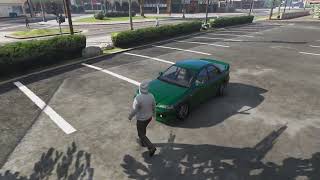
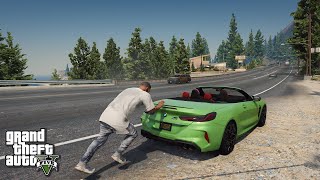
When the player is on foot and presses “Shift + E” next to a vehicle, the system activates. It automatically detects whether the player is in front of or behind the vehicle:
Front - pushes the vehicle backward
Back - pushes the vehicle forward
The player is positioned correctly, an appropriate pushing animation plays, and the vehicle is moved using GTA V's physics engine.
Controls
Shift + E - Start/stop pushing
W - Push the vehicle
A / D - Steer the vehicle
Changes v1.2
- The character now positions itself better on the vehicle. (Does not work well on some modded vehicles)
- The animation will only move when you start pushing.
- The pushing speed has been slowed down for realism.
Installation
Place PushVehicle.dll into your "scripts" folder.
Fully compatible with ScriptHookVDotNet3
When the player is on foot and presses “Shift + E” next to a vehicle, the system activates. It automatically detects whether the player is in front of or behind the vehicle:
Front - pushes the vehicle backward
Back - pushes the vehicle forward
The player is positioned correctly, an appropriate pushing animation plays, and the vehicle is moved using GTA V's physics engine.
Controls
Shift + E - Start/stop pushing
W - Push the vehicle
A / D - Steer the vehicle
Changes v1.2
- The character now positions itself better on the vehicle. (Does not work well on some modded vehicles)
- The animation will only move when you start pushing.
- The pushing speed has been slowed down for realism.
Installation
Place PushVehicle.dll into your "scripts" folder.
Fully compatible with ScriptHookVDotNet3
İlk Yüklenme Zamanı: 16 Ocak 2026 Cuma
Son Güncellenme Zamanı: 19 Ocak 2026 Pazartesi
Last Downloaded: 24 dakika önce
28 Yorum
More mods by wrieusa:
Push Vehicle
When the player is on foot and presses “Shift + E” next to a vehicle, the system activates. It automatically detects whether the player is in front of or behind the vehicle:
Front - pushes the vehicle backward
Back - pushes the vehicle forward
The player is positioned correctly, an appropriate pushing animation plays, and the vehicle is moved using GTA V's physics engine.
Controls
Shift + E - Start/stop pushing
W - Push the vehicle
A / D - Steer the vehicle
Changes v1.2
- The character now positions itself better on the vehicle. (Does not work well on some modded vehicles)
- The animation will only move when you start pushing.
- The pushing speed has been slowed down for realism.
Installation
Place PushVehicle.dll into your "scripts" folder.
Fully compatible with ScriptHookVDotNet3
When the player is on foot and presses “Shift + E” next to a vehicle, the system activates. It automatically detects whether the player is in front of or behind the vehicle:
Front - pushes the vehicle backward
Back - pushes the vehicle forward
The player is positioned correctly, an appropriate pushing animation plays, and the vehicle is moved using GTA V's physics engine.
Controls
Shift + E - Start/stop pushing
W - Push the vehicle
A / D - Steer the vehicle
Changes v1.2
- The character now positions itself better on the vehicle. (Does not work well on some modded vehicles)
- The animation will only move when you start pushing.
- The pushing speed has been slowed down for realism.
Installation
Place PushVehicle.dll into your "scripts" folder.
Fully compatible with ScriptHookVDotNet3
İlk Yüklenme Zamanı: 16 Ocak 2026 Cuma
Son Güncellenme Zamanı: 19 Ocak 2026 Pazartesi
Last Downloaded: 24 dakika önce
 5mods on Discord

@SenileServey2013 😂😂😂
didn't work, unfortunately
@SenileServey2013 Do you have the latest version of ScriptHookV and SHVDN3?
@wrieusa awesome and thanks for the update!
anyway to change controls?
@wrieusa ya
cool idea for rp
ini file to change keybinds would be good other than that great
@User20192910291 i will try to include it in the next update. thank you for your interest.
@jazzysoggy12 i will try to include it in the next update. thank you for your interest.
@InTheSky Thanks! Clever and well done.
Is it compatible with Legacy?
@Not_FK yes, compatible
@InTheSky I will add in the new update
@wrieusa Thank you for your help
Doesn't quite work for me though Im trying to see if its a conflict. It does play the animation (from rear) but vehicle doesn't move and I also can't escape from the action either.
ah yeah conflict with gameplayfixes, works when gameplay fixes is removed.
@wrieusa You can add an .ini file to modify the push keys, at least for an excellent mod
@VICTOR RIVERA I'll definitely add it when I find the time, thanks
Follwed the installation video, Getting this in game when gta v loads up (i see this notification above map)
1. Unhandeled exception in script "VehiclePushScript"
2. Null Reference Exception at SHVDN.NativeMemory.GetVehicleHandles(FVector3 Position, Single radius, Int32[] modelHashes)